Don't know the meaning .. check this out here
- Nicolas
Wednesday, July 22, 2009

Thursday, July 2, 2009
Change the Screen Rotation in your application
Windows Mobile devices allows user to rotate the screen orientation, on some devices, this rotation is automatically done while sliding keyboard is opened to provide the good orientation to user to get a chance to type text using the hardware keyboard. More advanced devices get an accelerometer and can automatically rotate the screen while the user physically rotate the device from portrait to landscape and vice versa.
Windows Embedded CE devices on their side can also have screen rotation enabled, but as they are usually for industrial purposes, this feature is not necessarily enabled.
On both version, when user have to do screen rotation the ChangeDisplaySettingsEx function is used. The sample code below shows up the steps to perform screen rotation.
Windows Embedded CE devices on their side can also have screen rotation enabled, but as they are usually for industrial purposes, this feature is not necessarily enabled.
On both version, when user have to do screen rotation the ChangeDisplaySettingsEx function is used. The sample code below shows up the steps to perform screen rotation.
BOOL RotateScreen(int iRotationAngle)
{
  int iAngle;

  // Check if rotation angle is a multiple of 90 degres
  if ((iRotationAngle % 90) != 0)
  {
    return FALSE;
  }

  // Screen rotation is a bit field value
  // 0 = 0, 1 = 90, 2 = 180, 4 = 270
  iAngle = iRotationAngle / 90;
  if( iAngle == 3 )
    iAngle = 0x4;

  //
  DEVMODE devMode;
  memset (&devMode, 0, sizeof (devMode));
  devMode.dmSize = sizeof (devMode);
  devMode.dmFields = DM_DISPLAYQUERYORIENTATION;

  // Retrieve the supported screen rotation angles
  if (DISP_CHANGE_SUCCESSFUL != ChangeDisplaySettingsEx(NULL, &devMode, NULL, CDS_TEST, NULL))
  {
    return FALSE;
  }

  // Check if required screen rotation is supported
  if (iAngle == 0 || iAngle & devMode.dmDisplayOrientation)
  {
    memset(&devMode, 0, sizeof (devMode));
    devMode.dmSize               = sizeof (devMode);
    devMode.dmFields             = DM_DISPLAYORIENTATION;
    devMode.dmDisplayOrientation = iAngle;

    if (DISP_CHANGE_SUCCESSFUL != ChangeDisplaySettingsEx(NULL, &devMode, NULL, CDS_RESET, NULL))
    {
       return FALSE;
    }
    else return TRUE;
  }

  return FALSE;
}
Thanks to Alban for his help.
- Nicolas
State and Notifications Broker API
The State and Notification Broker API provide an easy way to get notified while system state changed or registry content changed. This API is available for both Windows Embedded and Windows Mobile operating systems, and works with a provider and client.
The Provider:
The provider create in registry one entry per state managed, and is in charge of the update of those entries when states changed. Usually system states are defined in HKEY_CURRENT_USER\System\State and HKEY_LOCAL_MACHINE\System\State, and user defined (or applicative) states are located in HKEY_CURRENT_USER\Software\State and HKEY_LOCAL_MACHINE\Software\State. The snapi.h header file defines most of the system states notifications for various system functionalities like Phone, Mails, SMS Appointment, Battery, Screen Rotation ... and custom entries should be managed by your own.
The Client:
The client register to a state defined in registry by the Provider, and get notified by the operating system while value changed. Different notifications mechanism can be used :
The Provider:
The provider create in registry one entry per state managed, and is in charge of the update of those entries when states changed. Usually system states are defined in HKEY_CURRENT_USER\System\State and HKEY_LOCAL_MACHINE\System\State, and user defined (or applicative) states are located in HKEY_CURRENT_USER\Software\State and HKEY_LOCAL_MACHINE\Software\State. The snapi.h header file defines most of the system states notifications for various system functionalities like Phone, Mails, SMS Appointment, Battery, Screen Rotation ... and custom entries should be managed by your own.
The Client:
The client register to a state defined in registry by the Provider, and get notified by the operating system while value changed. Different notifications mechanism can be used :
- Application activation : can start a client application while registry content changed (or state changed)
- Message Queue : signal a state notification through a Message Queue
- Window message : signal a state notification via a Windows Message loop (WindowProc)
- Callback : signal a state notification using a call back function
The client should register for state notification using one of the following function depending on the type of notification required (RegistryNotifyApp, RegistryNotifyWindow, RegistryNotifyCallback or RegistryNotifyMsgQueue). When state change notification is received the client should read the value using the regular regsitry functions access, or RegistryGetDWORD or RegistryGetString. While notification is no longer required, the client have to call RegistryCloseNotification to close the notification.
No specific action is required by the provider except to update the registry values while internal application transition should generate external state notifications.
You can find a usage sample in the Windows Mobile SDK sample source code of the Battery Statistic :
%ProgramFiles%\Windows Mobile 6 SDK\Samples\PocketPC\CPP\win32\battstat
- Nicolas
Tuesday, June 16, 2009
Windows Mobile Local Authentication PlugIn
The Local Authentication Plugin (LAP) is a way to identify the user of a mobile phone, while applications need special rights to access features or perform actions. Basically user is prompted for authentication through a password that he previously configure on his mobile. The default LAP provided by Microsoft (see below), is a single PIN password, but you can implement your own if you need.
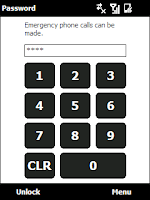

LAP Implementation
A LAP is a signed DLL share the following entry points :
- InitLAP : Call by the system to initialise the LAP while loaded.
- DeinitLAP : Call while LAP is unloaded
- VerifyUserStart : Call to start the GUI of the LAP
- VerifyUser : Call to validate the user, with or without a GUI. This functions returns while the user has been authenticated successfully or fails. Multiple calls to this function can be done by the system. Options parameter specifies how the user have to be validated.
- VU_NO_UI : while the system needs to validate the user, without displaying a window to the user.
- VerifyUserStop : Call to destroy the GUI and clean up.
- VerifyUserToTop : Call to bring to top the LAP Window.
- LAPCreateEnrollmentConfigDialog : Used to display configuration window to configure the pass-phrase of the LAP
To implement your own LAP you can start from scratch or use the sample LAP provided with the Windows Mobile SDK :
- for pocket PC : %ProgramFiles%\Windows Mobile 6 SDK\Samples\PocketPC\CPP\win32\LAP
- for smart phone : %ProgramFiles%\Windows Mobile 6 SDK\Samples\Smartphone\CPP\win32\LAP
The Local Authentication Subsystem (LASS) is in charge of the management of the LAP display and user validation.
To define a new LAP, add a new key in the registry :
[HKEY_LOCAL_MACHINE\Comm\Security\LASSD\LAP\myLAP]
"Dll"="myLAPDll.dll"
To select the current active LAP set the
[HKEY_LOCAL_MACHINE\Comm\Security\LASSD\LAP]
"ActiveLap"="myLAP"
LAP Configuration
The LAP Configuration should be done by the user through the Enrollment window accessible form the Parameter Menu using the Lock icon. In this window the user should be able to change its pass-phrase (or other if the LAP is not based on pass-phrase authentication).
For security reason this pass-phrase should not be saved in the registry as a clear string, but should be encrypted using a custom algorithm or the Windows MobileCryptoAPI.
For security reason this pass-phrase should not be saved in the registry as a clear string, but should be encrypted using a custom algorithm or the Windows MobileCryptoAPI.
Validate a User in your application
To check if user has been authenticated on the device you have two possibilities :
- ValidateUser is a blocking call to the LASS service, and give a way to provide parameters to the LAP, like an AE Key (specific security policy id), options (like VU_NO_UI to check the user without prompting any Window). Functions will return only after user authentication.
APP A;
HWND hMyWindow;

VerifyAndCallSecureFunction()
{
  DWORD LastError;
  GUID AEKeyForFoo = ...;
  if (VerifyUser(&AEKeyForFoo,"App A",hMyWindow,
           VU_UNTIL_SUCCESS,0)) // Call into LASS;
                                // This will
    CallSecureFunction() // call into active LAP
                         // and show LAP-specific UI
  else
    TellUserVerificationFailed(GetLastError()));
                         // display your own UI
}
- SHDeviceLockAndPrompt is a non blocking call, but will require user authentication for any activity on the device.
- Nicolas
Tuesday, June 9, 2009
CERegEditor : an alternative to Remote Registry Editor
Found a great atlternative to the Remote Registry Editor, without the requirement of the installation of a Visual Studio Smart Device component. Useful for non developper's guys... One of my favorite feature is the registry comparison, between two snapshots.
Check out this cool application here.
- Nicolas
Easy way to componentize modules
 Since Windows CE 4.2, Mike Hall is maintaining a power toy application helping to componentize your applications, drivers to integrate them inside your catalog views. This application is now available under the MSDN Code Gallery.
Big thanks to Mike for this CEFileWiz application helping beginners for an easy and quick understanding of the requirements for a componentized module.
- Nicolas
Wednesday, June 3, 2009
Get Ready for Windows Mobile 6.5

Microsoft announced last month the Windows Mobile 6.5 Release, and provide today an access to the Windows Mobile 6.5 Tool Kit to get your softwares ready for new coming mobile devices runnning this version of the operating system.
- Nicolas
Subscribe to:
Posts (Atom)


 Posts


