Dear Readers,
I'm moving forward and opening a new blog for Windows Embedded technologies.
The URL is : http://embeddingwindowssuccess.blogspot.fr/
- Nicolas
Tuesday, January 15, 2013
Moving forward to a new blog
Thursday, November 15, 2012
Windows Embedded Roadmaps revealed
Microsoft reveal the Windows Embedded products roadmap and naming.
link
- Nicolas
Monday, October 8, 2012
Adeneo Embedded announces the availability of the official Windows Embedded Compact 7 reference BSP for i.MX6
 |
| i.MX6x Saber Lite |
A binary demo image is available for free download directly on Adeneo Embedded website at http://www.adeneo-embedded.com/Products/Board-Support-Packages/Freescale-i.MX6-Sabre-Lite
Licensing of the source code BSP will be publicly available soon. For customers needing to start their development immediately, Adeneo Embedded proposes an “early adoption” program. Please contact sales@adeneo-embedded.com for more details on how to access to the BSP source code prior the public release.
- Nicolas

Wednesday, June 6, 2012
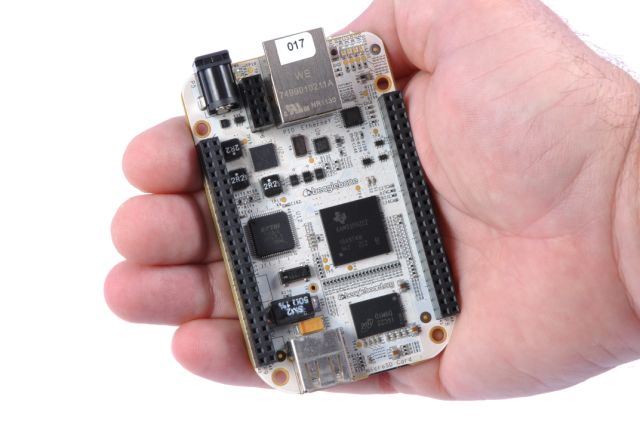
Adeneo Embedded releases BeagleBone Windows Embedded Compact 7 BSP for Community
Leveraging
the latest “Unified BSP” for Texas Instruments (TI) CortexTM-A8 MPUs,
Adeneo
Embedded supports the BeagleBone community with Windows Embedded Compact 7
Ecully,
France and Bellevue, WA, June 5, 2012 - Adeneo
Embedded, a platinum member of the Texas Instruments Design Network, and a
Microsoft Windows Embedded Gold Partner and recipient of the “Windows Embedded
Excellence Award” from 2007 through 2011, announces the availability of Windows
Embedded Compact 7 reference board support packages (BSPs), along with a full
suite of support services, including customized support, training and
development services, for the SitaraTM AM335x ARM® CortexTM-A8
processor-based community board, the BeagleBone.
BeagleBone is a low-cost,
high-expansion board that can either works stand-alone or acts as a USB or
Ethernet connected expansion companion for BeagleBoard and BeagleBoard-xM
boards, based on 720MHz SitaraTM MPU AM3359 with 256MB DDR2 memory.
BeagleBone BSP
developed by Adeneo Embedded is based on the latest version of the Texas
Instruments “unified BSP” for Windows Embedded Compact 7 which supports TI ARM®
CortexTM-A8 devices, including OMAP35x, AM335x, AM35x, AM37x, AM387x
SitaraTM ARM® MPUs and DaVinci DM37x and DM816x video processors. Through
a strategic collaboration between TI and Adeneo Embedded, this unified BSP is available
from Adeneo Embedded website since February 2012.
Windows Embedded
Compact 7 provides developers, designers and original equipment manufacturers
(OEMs) with a powerful real-time OS and a full suite of development tools,
enabling an integrated, streamlined development experience to speed devices to
market.
The Sitara AM335x platform
used on the BeagleBone is a cost and performance optimized solution targeting portable,
pocket-sized applications. Starting at $5 and consuming as low as 7 mW of
power, the AM335x ARM® CortexTM-A8 processors
provide low power consumption while prolonging battery life and reducing heat
emissions. Developers have access to a high performance processor with advanced
3D graphics capabilities, touch screen controller and sophisticated peripherals
all on a single chip.
"Releasing this new BSP for the BeagleBone
community board highlights our commitment to Texas Instruments and Microsoft to
support OEMs from early prototyping to shipment of their
devices," said Yannick Chammings, chief executive officer, Adeneo
Embedded. "Our ‘community board’
strategy was initiated with the release of Windows Embedded Compact 7 BSP for
BeagleBoard xM. With the availability of the BSP for BeagleBone, customers can
now evaluate Windows Embedded Compact 7 on the whole scope of development
platforms available for TI MPUs, covering prototyping, early evaluation, as
well as industrial development stages.”
“Texas
Instruments is excited to have Adeneo Embedded's support of the BeagleBoard
community with a BeagleBone-based Windows Embedded Compact 7 BSP,” said
Thomas Kelly, director, TI’s Design Network. “The combination of BeagleBone and Windows Embedded Compact will ease
the development of new innovative intelligent embedded systems for community
members and OEMs alike,”
“Adeneo Embedded’s support for the Windows Embedded Compact platform on
the BeagleBone community board opens new opportunities for better innovation
across the device development cycle, giving customers greater ability to create
optimized devices to power intelligent systems for the enterprise,” said
Lorraine Bardeen, marketing director for Windows Embedded EMEA at Microsoft.
OEMs interested in
using these technologies for their devices can discuss further support options
available by contacting our sales team at sales@adeneo-embedded.com.
Windows Embedded Compact 7 reference BSP for BeagleBone is available on Adeneo
Embedded website: http://www.adeneo-embedded.com.
About Adeneo Embedded
Adeneo Embedded
provides system integration, design, support and training services to companies
seeking world-class expertise in embedded solutions using high-performance
architectures. For over 10 years, Adeneo Embedded has helped clients, in all
stages of development; create profitable, feature-rich products that
incorporate software and hardware solutions based on Windows Embedded, Windows Phone
or .NET Micro Framework operating systems. Close working partnerships with
industry-leading silicon and software vendors allow Adeneo Embedded to apply
its experience to a wide range of embedded solutions for the automotive,
industrial, medical, multi-media,
navigation, networking, mobile and
wireless markets. Adeneo Embedded has a global sales and support network backed
by engineering offices in North America and Europe.
About the Texas
Instruments Design Network
Adeneo Embedded is a platinum member of the TI
Design Network, a premier group of independent, well-established companies that
offer products and system-level design and manufacturing services complementing
TI’s semiconductors to a worldwide customer base to accelerate product
innovation and time-to-market. Network members provide product design, hardware
and software system integration, turnkey product design, RF and processor
system modules, reference platforms, software development, proof-of-concept
design, feasibility studies, research, certification compliance, prototyping,
manufacturing, and product life cycle management. For more information about the
TI Design Network, please visit http://www.ti.com/designnetwork.
Trademarks
OMAP,
Sitara and DaVinci are trademarks of Texas Instruments. All other trademarks and registered
trademarks belong to their respective owners.
© 2012
Adeneo Embedded. All Rights Reserved. All other brands or product names are the
property of their respective holders
Further information
For more
information about Adeneo Embedded competences, products and services around
Windows Embedded technologies:
For a local contact in
Adeneo Press Contacts
Valerie
Cote
Executive Assistant, Adeneo
Embedded (EU)
Phone +33
426-492-539
Kathleen Wright
Office
Manager, Adeneo Embedded (USA)
Phone +1
(425) 749-4335
- Nicolas
Tuesday, June 5, 2012
Windows Embedded Standard 7 for Application developers
You are application developer and want to know more how WES7 (Windows Embedded Standard 7) can fit your needs for your final product, then I would encourage you to attempt the webinars on that topic provided by Adeneo Embedded and Arrow Electronics here
- Nicolas
Saturday, November 26, 2011
Windows Embedded products road map
Microsoft announces the Windows Embedded vNext products releases.
Check out Olivier's Bloch blog for details
- Nicolas
Thursday, November 24, 2011
Windows Embedded Compact 7: Enabling the Mouse to Activate Hyperlinks in the Web Browser
Have issue with the mouse click in IE under Windows Embedded Compact 7, then check out this work around.
- Nicolas
Thursday, August 11, 2011
July2011 Optional Updates Are On ECE For XPe SP3, Standard 2009 and Standard 7
July2011 Optional Updates Are On ECE For XPe SP3, Standard 2009 and Standard 7: "
*UPDATED 8/10/11 - Added link for Standard 7*
The July 2011 Optional Updates are now available on the ECE site for Windows® Embedded Standard 2009, Microsoft® Windows® XP Service Pack 3 and Windows Embedded Standard 7. Fixes include:
The list below applies to XP Embedded SP3 and Windows Embedded Standard 2009
KB2540135 - This update fixes the following issue
-
This update fixes an issue where the File Based Write Filter (FBWF) Provider might crash while getting FbwfCacheDetail instances, after seven or more files have been added to or changed in the FBWF overlay, resulting in the FbwfCacheDetail instances containing corrupted file names in the FileName property.
The list below applies to XP Embedded SP3, Windows Embedded Standard 2009 and Windows Embedded Standard 7 SP1
-
KB2539566 – This update fixes the following issues
- The Enhanced Write Filter Provider will crash if all EWF volumes have their Overlays disabled and the user tries to subscribe to a EwfOverlayStoreConfiguration event query. Until the new EWF Provider instance is created, all other commands will fail. Expected return code in this case would be 0x80070057 = ERROR_INVALID_PARAMETER. If a crash has occurred, the return code is 0x80041004 = WBEM_E_PROVIDER_FAILURE.
-
The event notification threshold values in EWF are inverted.
The list below applies to Windows Embedded Standard 7 SP1 and Windows Embedded Standard 7
KB2570814 (Windows Embedded Standard 7 SP1 only)- This update fixes the following issues:
- FBWFAPI by design does not allow multiple commands to be executed at the same time and it returns a clear error. The fix introduces locks in the File Based Write Filter (FBWF) Provider’s FBWFAPI calls, and all parallel requests will get served without errors returned.
- The cache detail (changed or added files in the FBWF cache) file can be flushed from the cache in the timespan between FbwfCacheDetail instantiation and property data gathering, which results in property data gathering returning an unexpected error.
- The event notification threshold values in FBWF are inverted.
KB2573437- This update fixes the following issue:
- The runtime to be incorrectly configured as “SERVICE_DEMAND_START”. Specifically, when the “Enhanced Write Filter with HORM” package is added to an image with one or more protected volumes that are configured with default settings for “DisableDefragSvc”, the runtime should be configured to disable Auto Defragmentation service (DefragSvc), by setting the “DefragSvc” service to “SERVICE_DISABLED”.
- This update also fixes the following issue for Windows Embedded Standard 7:
- An issue that causes EWF to be configured on all existing volumes on the system. Specifically, when the “Enhanced Write Filter with HORM” package is added to an image with one or more protected volumes that are configured with default settings for “EWFMode”. To correctly install this update, this KB must be applied to a Distribution Share prior to building and subsequent deployment of an image. Note that this fix was incorporated into Windows Embedded Standard SP1 when it shipped.
KB2573449 - This update fixes the following issues:
- Extends EWF support for storage devices that use TRIM. Without this update, TRIM commands sent by the Filesystem will bypass EWF and violate write filtering guarantees provided by EWF.
- This update also fixes the following issue for Windows Embedded Standard 7:
- A fatal registry corruption or BlueScreen (STOP error) can occur when EWF is enabled and “ewfmgr /all /commitanddisable” is executed followed by a reboot. Note that this fix was incorporated into Windows Embedded Standard SP1 when it shipped.
If you have questions on accessing the ECE, please email MS Mobile & Embedded Communications Feedback & Support, ECE@microsoft.com.
Thanks,
- Lynda
 "
"
- Nicolas
Wednesday, August 3, 2011
Windows Embedded Compact 7 Silverlight OpenGL Rendering Plug-in for the Freescale i.MX53 QSb
Windows Embedded Compact 7 Silverlight OpenGL Rendering Plug-in for the Freescale i.MX53 QSb: "
Developers who have selected the Freescale i.MX53 QSb to run nice multimedia applications with the Windows Embedded Compact 7 operating system can benefit from an optimized rendering solution.
- NicolasMonday, May 23, 2011
Windows Embedded Compact 7 Self Train Videos
Microsoft release few days ago a set of technical videos, for self training on this technology. Covering from debugging to power management, those videos will help you to understand the internal mechanism of this operating system.
Check out the videos at : Microsoft Showcase.
- Nicolas
Thursday, March 3, 2011
Freescale i.MX53 Quick Start BSP availability
 Adeneo Embedded, a preferred partner of Freescale Semiconductors for Windows Embedded, Linux and Android system integration on Freescale i.MX architecture, announce today the availability of 2 new reference board support packages for i.MX53 processor.
Targeting the newly released Freescale i.MX53 Quick Start development platform, Windows Embedded Compact 7 and Android reference BSPs provide extended user experience to OEMs developing advanced graphical and multimedia solutions for industrial, medical or home appliances market.
Android BSP is available for free in source code from Adeneo Embedded website. Compact7 source BSP license can be purchased for only US$500. By delivering both Android and Compact7 reference solutions for i.MX53, Adeneo Embedded expands further its collaboration with Freescale and reinforces its availability to help device makers in their developments through support, training and development services around Windows Embedded, Linux and Android technologies.
- Nicolas
Wednesday, March 2, 2011
Windows Embedded Compact 7 BSPs from Adeneo Embedded
As mentioned yesterday the Microsoft Windows Embedded Compact 7 OS has been released and now Adeneo Embedded is releasing Windows Embedded Compact 7 BSPs for the following platforms and architectures:
- Atmel AT91SAM9 architecture, covering AT91SAM9G20, AT91SAM9G45 and AT91SAM9M10 reference development kits.
- Freescale i.MX architecture, with reference BSPs for i.MX28 and i.MX53, targeting Freescale i.MX28EVK and i.MX53 QuickStart platforms.
- NXP LPC3250 reference development kit
- Texas Instruments AM37x and DM37x with a reference BSP for the BeagleBoard-XM, based on the unified BSP architecture for TI Cortex-A8 platforms co-developed by Adeneo and Texas Instruments.
- Nicolas
Adeneo Embedded website refreshed

- Nicolas
Tuesday, March 1, 2011
Windows Embedded Compact MSDN

All the MSDN documentation for the Windows Embedded Compact 7 operating system is available only, giving you a chance to check what's new during the download of the tool :-)
- Nicolas
Windows Embedded Compact 7 Release

Check out the list from the the product datasheet link.
- Nicolas
Thursday, January 6, 2011
WEC 7 : First Worldwide training
Adeneo Embedded will deliver Windows Embedded Compact 7 trainings based on the Microsoft official training curriculum.
The next sessions in Europe are
- February 8th-11th – Paris, France
- March 1st-4th – Sonderborg, Denmark
- March 8th-11th – Milano, Italy
- March 15th-18th – Paris, France
- February 28th-March 3rd – Boston, MA
- March 14th-17th – Dallas, TX
- April 18th-21st – Denver, CO
Check out the Press Release for content and contacts informations.
- Nicolas
Tuesday, November 16, 2010
Windows Phone 7 Programming Free Ebook
If you plan to start some development around Windows Phone 7 devices, I would suggest you to read this free ebook recently published :
Programming Windows Phone 7 by Charles Petzold (available here)
- Nicolas

Wednesday, November 3, 2010
Driver wrapper for C#
From .NET Compact Framework, there is no API allowing access to the driver interfaces, as the main reason of the framework existance is to be able to run on whatever hardware an application without having to recompile it, this by the usage of the CLR (Common Language Runtime).
But developper working on embedded systems usually have to access those drivers that are specific to the platform. So in that case they need an access to the native APIs.
Identify the needs
Before getting access to the driver from C# you have to identify the APIs that have to be mapped from native to managed environment. Accessing a driver from native code is performed using the following APIs :
- CreateFile : in order to open a driver instance
- CloseHandle : to close the opened instance
- ReadFile : read data from the stream
- WriteFile : write data into the stream
- Seek : move data pointer in the stream
- DeviceIoControl : to perform driver specific actions with the usage of the CTL_CODE macro for commands IDs
Map the native API
In order to map the native API into C#, the usage of the interop services is required.
Note : you can find native API mapping from pinvoke.net (http://www.pinvoke.net/) website.
Create a driver class
We have to define the Driver class that will handle all the wrapping actions for us.
using System;
using System.Runtime.InteropServices;

namespace Adeneo_Embedded
{
   public class Driver
   {
   }
}
Map the mandatory native functions
- CreateFile function
// This function creates, opens, or truncates a file, communications
// resource, disk device, or console. It returns a handle that can be
// used to access the object. It can also open and return a handle to
// a directory.
[DllImport ("coredll.dll")]
private static extern int CreateFile(
 string lpFileName,
 int dwDesiredAccess,
 int dwShareMode,
 int lpSecurityAttributes,
 int dwCreationDisposition,
 int dwFlagsAndAttributes,
 int hTemplateFile);
- CloseHandle function
// This function closes an open object handle
[DllImport ("coredll.dll")]
private static extern int CloseHandle(int hObject);
- ReadFile function
// This function reads data from a file, starting at the position indicated
// by the file pointer. After the read operation has been completed, the
// file pointer is adjusted by the number of bytes actually read.
[DllImport ("coredll.dll")]
private static extern int ReadFile(
 int hFile,
 byte[] lpBuffer,
 int nNumberOfBytesToRead,
 ref int lpNumberOfBytesRead,
 ref OVERLAPPED lpOverlapped);
- WriteFile function
// This function writes data to a file. WriteFile starts writing data to
// the file at the position indicated by the file pointer. After the write
// operation has been completed, the file pointer is adjusted by the number
// of bytes actually written.
[DllImport ("coredll.dll")]
private static extern int WriteFile(
 int hFile,
 byte[] lpBuffer,
 int nNumberOfBytesToWrite,
 ref int lpNumberOfBytesWritten,
 ref OVERLAPPED lpOverlapped);
- DeviceIoControl function
// This function sends an IOCTL directly to a specified device driver,
// causing the corresponding device to perform the specified operation.
[DllImport ("coredll.dll")]
private static extern int DeviceIoControl(
 int hFile,
 uint dwIoControlCode,
 byte[] lpInBuffer,
 uint nInBufferSize,
 byte[] lpOutBuffer,
 uint nOutBufferSize,
 ref uint lpBytesReturned,
 ref OVERLAPPED lpOverlapped);
Redefine the CTL_CODE macro
When driver developper is implementing the driver IoControls and when the application developper want to execute this command, then both should refer to the same identifier. To get a unique identifier for a driver command, the CTL_CODE macro is used.
//
// Macro definition for defining IOCTL and FSCTL function control codes.  Note
// that function codes 0-2047 are reserved for Microsoft Corporation, and
// 2048-4095 are reserved for customers.
//

public uint CTL_CODE(uint DeviceType, uint Function, uint Method, uint Access )
{
}
Redefine the constant values
CreateFile, DeviceIoControl, and CTL_CODE code is using constant that also have to be redefined in our driver class.
#region "constants"
 private const int GENERIC_READ = unchecked((int)0x80000000);
 private const int GENERIC_WRITE = 0x40000000;
 private const int OPEN_EXISTING = 3;
          private const int INVALID_HANDLE_VALUE = -1;

#region "CTL_CODE"
#region "Method"
 //
 // Define the method codes for how buffers are passed for I/O and FS controls
 //
 public const uint METHOD_BUFFERED = 0;
 public const uint METHOD_IN_DIRECT = 1;
 public const uint METHOD_OUT_DIRECT = 2;
 public const uint METHOD_NEITHER = 3;
#endregion // "Method"

#region "Access"
 //
 // Define the access check value for any access
 //
 //
 // The FILE_READ_ACCESS and FILE_WRITE_ACCESS constants are also defined in
 // ntioapi.h as FILE_READ_DATA and FILE_WRITE_DATA. The values for these
 // constants *MUST* always be in sync.
 //

 public const uint FILE_ANY_ACCESS = 0;
 public const uint FILE_READ_ACCESS = ( 0x0001 );  // file & pipe
 public const uint FILE_WRITE_ACCESS = ( 0x0002 );    // file & pipe
#endregion // "Access"

#region "DeviceType"
// begin_ntddk begin_nthal begin_ntifs
//
// Define the various device type values.  Note that values used by Microsoft
// Corporation are in the range 0-32767, and 32768-65535 are reserved for use
// by customers.
//
 public const uint FILE_DEVICE_BEEP                = 0x00000001;
 public const uint FILE_DEVICE_CD_ROM              = 0x00000002;
 public const uint FILE_DEVICE_CD_ROM_FILE_SYSTEM  = 0x00000003;
 public const uint FILE_DEVICE_CONTROLLER          = 0x00000004;
 public const uint FILE_DEVICE_DATALINK            = 0x00000005;
 public const uint FILE_DEVICE_DFS                 = 0x00000006;
 public const uint FILE_DEVICE_DISK                = 0x00000007;
 public const uint FILE_DEVICE_DISK_FILE_SYSTEM    = 0x00000008;
 public const uint FILE_DEVICE_FILE_SYSTEM         = 0x00000009;
 public const uint FILE_DEVICE_INPORT_PORT         = 0x0000000a;
 public const uint FILE_DEVICE_KEYBOARD            = 0x0000000b;
 public const uint FILE_DEVICE_MAILSLOT            = 0x0000000c;
 public const uint FILE_DEVICE_MIDI_IN             = 0x0000000d;
 public const uint FILE_DEVICE_MIDI_OUT            = 0x0000000e;
 public const uint FILE_DEVICE_MOUSE               = 0x0000000f;
 public const uint FILE_DEVICE_MULTI_UNC_PROVIDER  = 0x00000010;
 public const uint FILE_DEVICE_NAMED_PIPE          = 0x00000011;
 public const uint FILE_DEVICE_NETWORK             = 0x00000012;
 public const uint FILE_DEVICE_NETWORK_BROWSER     = 0x00000013;
 public const uint FILE_DEVICE_NETWORK_FILE_SYSTEM = 0x00000014;
 public const uint FILE_DEVICE_NULL                = 0x00000015;
 public const uint FILE_DEVICE_PARALLEL_PORT       = 0x00000016;
 public const uint FILE_DEVICE_PHYSICAL_NETCARD    = 0x00000017;
 public const uint FILE_DEVICE_PRINTER             = 0x00000018;
 public const uint FILE_DEVICE_SCANNER             = 0x00000019;
 public const uint FILE_DEVICE_SERIAL_MOUSE_PORT   = 0x0000001a;
 public const uint FILE_DEVICE_SERIAL_PORT         = 0x0000001b;
 public const uint FILE_DEVICE_SCREEN              = 0x0000001c;
 public const uint FILE_DEVICE_SOUND               = 0x0000001d;
 public const uint FILE_DEVICE_STREAMS             = 0x0000001e;
 public const uint FILE_DEVICE_TAPE                = 0x0000001f;
 public const uint FILE_DEVICE_TAPE_FILE_SYSTEM    = 0x00000020;
 public const uint FILE_DEVICE_TRANSPORT           = 0x00000021;
 public const uint FILE_DEVICE_UNKNOWN             = 0x00000022;
 public const uint FILE_DEVICE_VIDEO               = 0x00000023;
 public const uint FILE_DEVICE_VIRTUAL_DISK        = 0x00000024;
 public const uint FILE_DEVICE_WAVE_IN             = 0x00000025;
 public const uint FILE_DEVICE_WAVE_OUT            = 0x00000026;
 public const uint FILE_DEVICE_8042_PORT           = 0x00000027;
 public const uint FILE_DEVICE_NETWORK_REDIRECTOR  = 0x00000028;
 public const uint FILE_DEVICE_PARTITION           = 0x00000029;
 public const uint FILE_DEVICE_STORE               = 0x00000030;

#endregion // "DeviceType"


#endregion // "CTL_CODE"
#endregion // "constants"
Filling the empty egg
A bit of additional work is required to accomplish our task, the driver class goal is to map the driver access within C#, but also an abstraction class to deeply simplify the access to the driver and then offer a servicing class for your application.
#region "private members"
   private int mintHandle  = INVALID_HANDLE_VALUE;   // driver handle
#endregion // "private members"

#region "Constructor-Destrcutor"
public Driver()
{
}

~ Driver ()
{
   if (mintHandle != INVALID_HANDLE_VALUE)
       Close ();
}
#endregion // Constructor-Destrcutor

#region "Open"
public bool Open(String strDriverName)
{
   if (mintHandle != INVALID_HANDLE_VALUE)
 {
       Close ();
 }

   mintHandle = CreateFile(strDriverName, GENERIC_READ | GENERIC_WRITE, 0, 0, OPEN_EXISTING, 0, 0);

   return mintHandle != INVALID_HANDLE_VALUE;
}
#endregion          // open the driver

#region "Close"
public bool Close()
{
 bool bResult = false;
 int  iValue;
   if (mintHandle != INVALID_HANDLE_VALUE)
 {
       iValue = CloseHandle (mintHandle);
  if (iValue != 0)
  {
   bResult = true;
   mintHandle = INVALID_HANDLE_VALUE;
  }
 }

  return bResult;
}
#endregion          // close the driver

#region "Read"
public bool Read(byte []buffer, ref int lpBytesToRead)
{
 bool bResult = false;
   int lpNumberOfBytesRead = 0;
   int intResult = 0;
 OVERLAPPED lpOverlapped = new OVERLAPPED();

   if (mintHandle != INVALID_HANDLE_VALUE)
 {
       intResult = ReadFile(mintHandle, buffer, lpBytesToRead, ref lpNumberOfBytesRead, ref lpOverlapped);

       if (intResult == 0)
       {
           throw new Exception("Error reading driver");
       }
       else
       {
           lpBytesToRead = lpNumberOfBytesRead;
           bResult = true;
       }
 }

  return bResult;
}
#endregion          // read data from the driver

#region "Write"
public bool Write(byte []buffer, ref int lpBytesToWrite)
{
 bool bResult = false;
   int lpNumberOfBytesWrite = 0;
   int intResult = 0;
 OVERLAPPED lpOverlapped = new OVERLAPPED();

   if (mintHandle != INVALID_HANDLE_VALUE)
 {
       intResult = WriteFile(mintHandle, buffer, lpBytesToWrite, ref lpNumberOfBytesWrite, ref lpOverlapped);

       if (intResult == 0)
       {
           throw new Exception("Error writing driver");
       }
       else
       {
           lpBytesToWrite = lpNumberOfBytesWrite;
           bResult = true;
       }
 }

  return bResult;
}
#endregion          // read data from the driver

#region "IOControl"
public bool IOControl(uint IoControlCode, byte []bufferIn, uint bufferSizeIn, byte []bufferOut, ref uint lpBufferSizeOut)
{
 bool bResult = false;
   uint lpNumberOfBytesReturned = 0;
   int intResult = 0;
   OVERLAPPED lpOverlapped = new OVERLAPPED();

   if (mintHandle != INVALID_HANDLE_VALUE)
 {
    intResult = DeviceIoControl(mintHandle, IoControlCode, bufferIn, bufferSizeIn, bufferOut, lpBufferSizeOut, ref lpNumberOfBytesReturned, ref lpOverlapped);

       if (intResult == 0)
       {
           throw new Exception("Error IOcontrol driver");
       }
       else
       {
           lpBufferSizeOut = lpNumberOfBytesReturned;
           bResult = true;
       }
 }

  return bResult;
}
#endregion          // read data from the driver
This is it, now we have a class that really simplify the access to the drivers.
Driver myI2CDriver = new Driver();
myI2CDriver.Open("I2C1:");
…
myI2CDriver.Close();
- Nicolas
Tuesday, November 2, 2010
WEC 7 : Build Solution performing a Buid & Sysgen
Using the CTP version of Windows Embedded Compact 7 available from the Microsoft Connect website (http://connect.microsoft.com), you will face a unexpected behavior of the development environment.
When building a solution using the Build menu, you will launch a Build and Sysgen (blddemo.bat) command instead of a Sysgen (blddemo -q) as it was the case in the previous version. This Build and Sysgen action is rebuilding the complete content of the $(_WINCEROOT)\Public folder, that is usually useful when you are making modification into this folder. In the case of the build of a runtime image, this step is not required and is increasing the build time.
As this action is not required, it is useful to avoid the execution of a such action. This can be done by modifying the blddemo.bat file located in $(_WINCEROOT)\PUBLIC\COMMON\OAK\MISC and adding in the first lines :
As this action is not required, it is useful to avoid the execution of a such action. This can be done by modifying the blddemo.bat file located in $(_WINCEROOT)\PUBLIC\COMMON\OAK\MISC and adding in the first lines :
If "%1"=="" goto :EOF
- Nicolas
Subscribe to:
Posts (Atom)


 Posts
Posts


